
Somebody talked you into a WordPress website years ago. They said it would be easy to edit, inexpensive to run, and flexible enough to do whatever your business needed.
Now changing a product page means opening a support ticket. Updates come with a warning to back everything up first. The site is slow, the editor is confusing, and you are paying for hosting, maintenance, and plugins just to keep the same website working.
Meanwhile, your company builds highly specialized equipment that solves genuinely difficult problems.
Updating your website should not be one of them.
I have written about why we discourage WordPress for business websites before. This is the more useful follow-up: what getting out actually looks like, why migration costs are changing, and how you keep control of your content afterward.
The Problem Is Bigger Than a Slow Website
Not every WordPress site is a mess. A well-built, actively maintained implementation can work. But that does not help the manufacturer sitting on years of theme modifications, abandoned plugins, and workarounds nobody wants to touch.
The original developer is gone. The current agency is reluctant to change anything. Your marketing person knows which buttons not to click.
That is not a content strategy. It is institutional knowledge about how to avoid breaking a website.
For technical manufacturers, the consequences reach past the maintenance bill. An engineer needs to check a specification. A purchasing manager wants a current certification. A potential customer needs to know whether your product works in their operating environment.
If those answers are buried, difficult to read on a phone, or trapped in an outdated document, the website is making qualification harder than it needs to be.
Your team feels the same friction from the other side. A new application page gets postponed because the template cannot support it. Sales keeps emailing the updated datasheet because the website still has the old one. A paid campaign sends everyone to a generic page because creating the right landing page is too much work.
The expensive part is not just keeping the website running. It is everything you stop doing because the website gets in the way.
We Translate the Site, Not the Problems
One of our core processes at Byer Co is translating legacy websites into modern, accessible sites with a better user experience. Our current approach uses SvelteKit and Cloudflare, with content administration tailored to the client.
The framework names matter to the people building it. You should care about whether your customers can find what they need and whether your team can do its job.
Migration does not have to mean throwing away your brand, rewriting every page, or starting a six-month debate about the homepage. Existing content, useful design decisions, and pages that already attract qualified traffic are assets worth keeping.
The work is separating those assets from the machinery that makes them difficult to use.
For a manufacturer, that could mean giving product specifications a consistent structure, making related documents easy to find, or connecting an application page directly to the relevant product and inquiry form. We covered the buyer-side requirements in more detail in our article on product pages that help engineers and buyers convert.
Accessibility belongs in this work from the beginning: meaningful headings, readable contrast, keyboard navigation, labeled forms, and clear error messages. Choosing a newer framework does not automatically make a site accessible. Those details have to be implemented and tested.
The same goes for speed. Shipping a heavy page through Cloudflare does not magically make it lightweight. Images, scripts, page structure, and third-party tools still need attention.
One Less Hosting Bill
We migrated a client from WordPress to our Cloudflare/SvelteKit system. The new hosting setup runs within Cloudflare's free tier at its current usage, eliminating ~$80 per month in WP Engine hosting costs associated with the previous environments and legacy setup.
That is $960 on an annualized basis, if the monthly saving continues. It is not a claim that a full year of savings has already accrued.
It is a concrete example of the platform migration and hosting economics, not evidence of a manufacturing lead-generation result.
And let's keep the numbers honest: the $80 is a hosting saving. It is not a claim that migration, support, domains, email, or every connected service costs nothing. Free-tier eligibility depends on usage, required services, and the provider's limits and pricing. Other sites may need paid infrastructure.
Still, paying less to host a better-suited platform is a useful outcome. You do not have to preserve an old hosting arrangement just because it came with the original website.
The larger opportunity is what becomes practical once the team is no longer organizing its work around that legacy setup.
Specialized Agents Change the Migration Economics
The understandable objection is: "Replacing the website will cost more than putting up with it."
Historically, migration involved a lot of repetitive manual production. Rebuilding templates. Moving content. Recreating components. Checking links. Comparing pages. Even when the business wanted to preserve most of the site, somebody still had to translate all of it.
Our specialized agents now handle much of that migration work, substantially reducing the manual effort and associated cost.
This is not asking a chatbot to invent a new website and publishing whatever comes back. Agent-assisted work can include translating existing page structures into components, moving content into defined fields, and helping identify inconsistencies for review. The existing website supplies source material; the project requirements define what the replacement needs to do.
Our team remains responsible for architecture, user experience, technical accuracy, accessibility review, and launch decisions. A manufacturer's pressure rating, material specification, or certification is not something an agent gets to improvise.
There is no honest universal percentage discount. A brochure site and a multilingual product catalog with distributor integrations are different projects. Content condition, custom functionality, and integration requirements still determine scope.
But the economics have changed. Much of the repetitive translation work no longer needs to be priced as if a developer were rebuilding every page by hand.
That gives us more room to focus the project on the parts customers actually notice.
Yes, Your Team Can Still Edit the Content
Leaving WordPress does not mean sending your developer an email every time you need to change a sentence.
Our approach includes an admin panel tailored to what your team needs to manage. The editing experience and the public website do not have to be the same application.
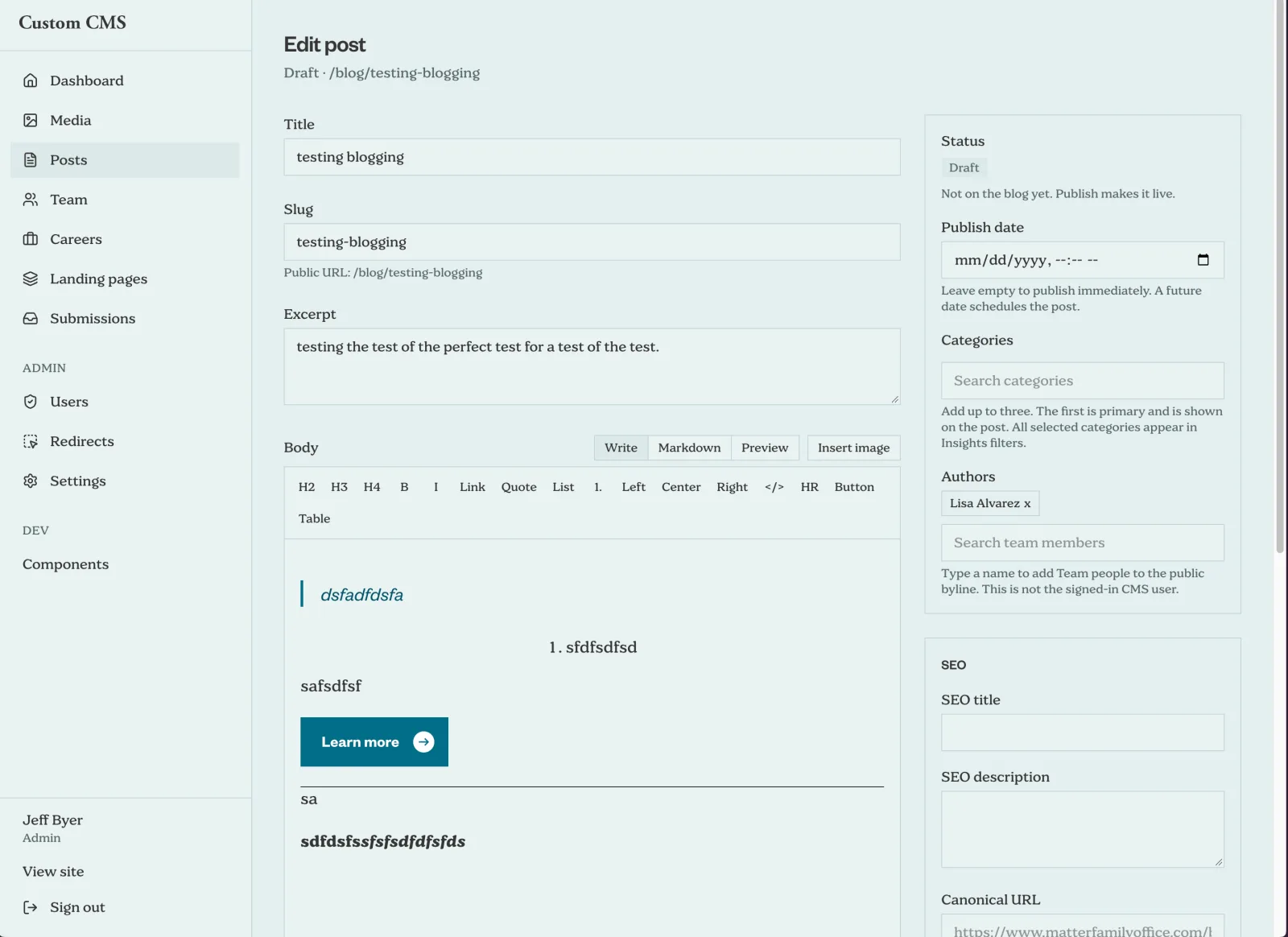
For a technical manufacturer, the agreed content model might include product names, specifications, application descriptions, datasheets, certifications, team profiles, and news. Instead of navigating a general-purpose page builder, an editor works with fields that match the content.
Need to replace a datasheet? That should be a document update, not an exercise in page layout. Need to change a product specification? The editor should not have to understand the CSS that displays it.
The distinction is important: routine content editing belongs with your team. New functionality, new content structures, and substantial layout changes may still need development. We define that boundary during scoping, including who can publish and which changes need review.
A custom admin should not become a new form of dependency, either. Before approving a migration, ask who controls the source code, hosting accounts, content exports, and documentation, and how another developer would take over. Getting out of one difficult platform is not a reason to accept an undocumented replacement.
A Migration Has to Protect What Already Works
Moving platforms is not permission to lose your search traffic, break your document links, or discover after launch that inquiries never reach sales.
For a manufacturer, the migration scope needs to account for:
- Existing URLs and search visibility. Inventory indexed pages and valuable landing pages. Preserve useful URLs where possible, map permanent redirects where needed, and check metadata, canonical tags, sitemaps, and internal links. No migration can guarantee unchanged rankings.
- Technical content and downloads. Product specifications, units, certifications, CAD files, and datasheets need accuracy checks. Documents linked from customer bookmarks and sales emails matter even when they are not prominent in the navigation.
- Forms and connected systems. Test inquiry delivery, confirmation states, file handling where applicable, CRM connections, spam protection, and analytics. A success message alone does not prove the inquiry arrived.
- Real use before and after launch. Review representative pages on mobile, test keyboard access and content editing, and agree on a rollback plan. After launch, monitor errors, indexing, and inquiry delivery.
These are project requirements, not optional extras to consider after the new site looks good.
Modern infrastructure also still needs maintenance. Dependencies, authentication, backups, monitoring, and third-party services do not disappear. The objective is a simpler, more manageable system, not a promise that nobody will ever need to maintain software again.
Give the Growth Team Something It Can Work With
A better website should make the next useful marketing decision easier to execute.
If sales keeps hearing the same application question, the team should be able to publish a clear answer and connect it to the right products. If a campaign targets a specific industry, it should have a relevant landing page. If buyers abandon an inquiry form, the team needs reliable measurement and a practical way to improve it.
That is why we treat migration as part of the growth infrastructure, not just a development handoff. The goal is a dependable platform for clearer content, better buyer journeys, and ongoing lead-generation work.
A platform change alone does not create demand or guarantee more leads. Your positioning, technical proof, traffic quality, and sales follow-up still matter. But a slow, fragile website should not be the reason your team cannot improve any of them.
If your current WordPress site serves customers well and is straightforward to manage, migration may not be your highest priority. If every improvement turns into a workaround, it is worth reassessing the cost of staying.
You do not need to keep funding yesterday's website problems. And replacing the platform does not have to mean starting your business's entire web presence over.
Talk to Byer Co about your existing website. Bring the URL, what your team struggles to update, and the systems the site needs to connect to. We can work from that to define what is worth keeping, what needs to change, and what a migration would actually involve.